The harness: what wraps the loop
In 1.1 you stepped through a loop with one tool. Claude Code is the same loop, wrapped in a lot more software. That wrapper is the harness. The book's working definition (Book §3.1):
An agent harness is the runtime scaffolding that turns a base language model into an autonomous agent. It manages the agent loop, the tools the model can call, the permissions around those tools, and the context that moves in and out of each turn.
The model is the brain; the harness is the body. And the harness is the part you can change.
The four components (Book §3.3)
| Component | In Claude Code | In the Parcelly agent from 1.1 |
|---|---|---|
| Tools | read/write/edit files, run commands, search, web fetch, plus anything added via MCP | lookup_order |
| Context | system prompt, chat history, CLAUDE.md, open files, tool results | the conversation |
| Permissions | asks before running commands, deleting, pushing, network | none (it trusted every call) |
| Memory | CLAUDE.md, skills, slash commands | none |
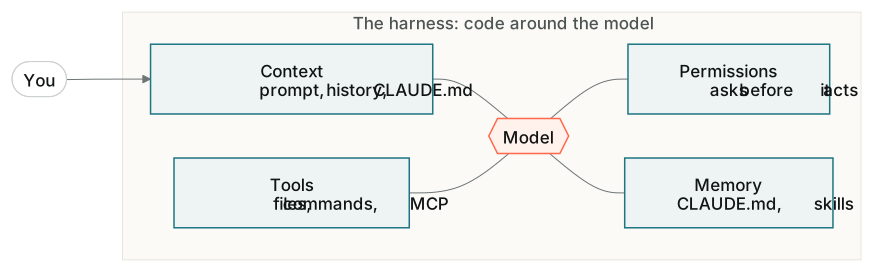
When a Claude Code session feels wrong, it's almost always one of those four levers. Every customisation you'll meet in 1.3 and 1.4 (CLAUDE.md, Skills, MCP, Subagents) is a change to the harness, not the model.
The landscape (Book §3.4)
Claude Code, Cursor, Cline, Codex CLI, Lovable and opencode are all harnesses around the same loop, with different trade-offs in surface, models and openness. In production you'll often swap the build-time harness (Claude Code) for a run-time one (the Claude Agent SDK, or your own) with the same model underneath. That's a conversation for Module 1's live sessions, and for Module 2, where you build a harness of your own.
Claude Code as a partner, not a vending machine
The skill isn't typing prompts. It's directing:
- Plan first. Use plan mode for anything bigger than a one-file change. Read the plan, push back, then let it build.
- Scope small. One feature per request.
- Read what it wrote. Book §3.11 Reading Code You Didn't Write is the most underrated section for PMs. Ask "walk me through this file" until you could explain it to a client.
- Watch permissions. Read what it wants to run before you approve it, and ask when you can't tell.
/clearbetween tasks, because context is cost and confusion.- Interrupt a flailing loop. If it's retrying the same fix, stop it (Esc) and re-plan.
This topic's steps put plan mode to work on one small build: a tip splitter, planned first, then built.