
Six modules, one system
The bootcamp is about forward deployed engineering: sitting with a real customer, working out what they need, and shipping an AI system that works for them, end to end. It runs in six modules. Each one adds a layer to what you built in the one before, so by the end you've taken a system from a first agent to production.
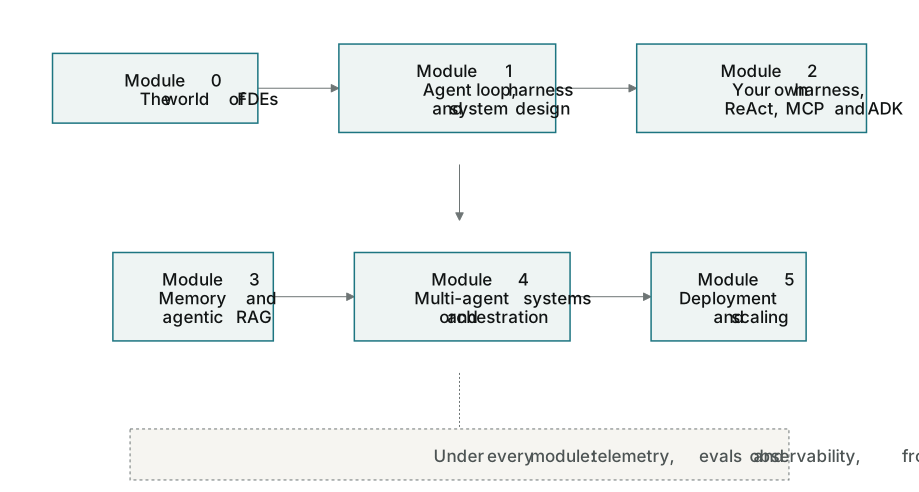
Module 0 · Welcome to the World of FDEs
What an FDE does, and how to do it well with people as well as code: leading without authority, communicating with a client's team, and landing the role. It also sets out how this course gets you there. After it you can describe the job and where you fit in a client's team. Here in the companion, Module 0 also sets up your workbench and opens up the model.
Module 1 · Agent Loop, Harness & System Design
How agents reason and act, what a harness does, and the fundamentals of AI system design and architecture. You also meet the Claude Code ecosystem, which is the build partner you'll use for the rest of the course. After it you can explain what turns a model into an agent, and direct Claude Code through a build.
Module 2 · Building Your Own Harness, ReAct Agents, MCP & ADK
You design your own harness and ReAct agents, connect them with MCP and ADK, and weigh the system design trade-offs. After it you've built the loop yourself instead of borrowing one, and you can say why you made each choice.
Module 3 · Memory & Multimodal Agentic RAG
You give agents memory, and retrieval that reasons across text and video, measured against golden datasets. After it your agent can find and use what it needs from a large body of material, and you can show how well it does.
Module 4 · Multi-agent Systems with MCP, A2A, and Orchestration
You coordinate agents, tools and outside systems so that multi-step workflows stay reliable under real load. After it you can split a job across several agents and keep the whole thing dependable.
Module 5 · Deployment & Scaling
You take agentic systems to production: deploy them, scale them, and keep them observable under real traffic. After it what you built runs for real users, and you can see what it's doing.
How the projects build
The course has four projects, and each one builds on the one before. You don't start over: you take what you shipped and add the next layer. By the end you have a product that works end to end, deployed, with evals and observability built in from the first project, not bolted on at the end. The course closes with a capstone on a problem you choose.
There's also a specialization workshop on Voice AI Agents: a dedicated live session of three to four hours where you build an open-source voice agent end to end.
How to use this companion
This site follows the same modules. Each one has a few topics, and every topic has the same shape: a short video at the top, notes like these under it, and a few steps on the right that you tick off. Most steps are a message to send in the Claude panel in VS Code. You won't need the terminal.
- Before day one, do everything that's open now: Module 0, Module 1, and the first topics of Modules 2 and 5. It's about two hours. It gets your laptop ready and gives you the words we use in class, so the live sessions can start with building.
- During the course, come back to the module you're in. New topics appear here as the course reaches them, and the modules marked coming soon fill in.
- Topics don't lock. Go in order the first time; later, jump to whatever you need. Where a topic uses something you built earlier, its steps say so.
- Get stuck early. If something breaks, paste the message into the Claude panel and ask what it means. Topic 0.2 has fixes for the setup problems people hit most.