Four ways to shape the harness
1.2 showed that the harness, not the model, is the part you control. Claude Code gives you four extension points. This topic covers the first two; 1.4 covers the other two.
| Extension | What it is | Reach for it when | Read |
|---|---|---|---|
| CLAUDE.md | A file the harness loads into context at the start of every session | Claude keeps forgetting your project's conventions | Book Ch 2 §2.1–2.5 |
| Skills | A packaged, named workflow (SKILL.md) Claude can run on request | You do the same multi-step task every week | Book Ch 4 §4.1–4.8 |
| MCP connectors | A standard protocol for giving the harness new tools (browser, databases, SaaS) | Claude needs to touch a system it can't reach | Book §3.12 |
| Subagents | A specialist with its own context window, tools and model | A task is big, separable, or would pollute your main context | Book Ch 5 §5.1–5.3 |
CLAUDE.md: memory you write down
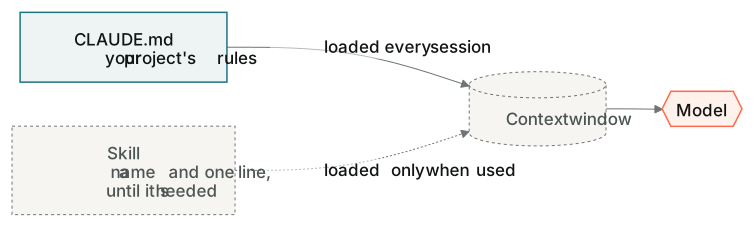
Every session starts from zero, because the model is stateless (0.3). CLAUDE.md is how you stop re-explaining your project. It's a plain text file in your project folder, and the harness puts it into context before you type a word. Write it like a briefing for a new engineer: what the project is, who it's for, how to run it, and the rules that must never break. Keep it short. Everything in it costs tokens on every turn.
A CLAUDE.md inside a subfolder applies when Claude works in that folder. The companion kit uses this: its own CLAUDE.md is what turns Claude into your tutor, and in this topic's steps you add a second one, inside your tip splitter's folder, with one rule. Then you start a fresh conversation and see whether Claude still follows it.
Skills: one word, a whole workflow
A skill is a folder with a SKILL.md that describes a job step by step. Claude can pick it up on its own when the job comes up, or you call it by name with a slash. You've already used two: /companion and /companion-explain are skills in the companion kit. Before you trust a skill, run it on a few real examples and check what comes back. Before you use someone else's, read what it's allowed to do.